
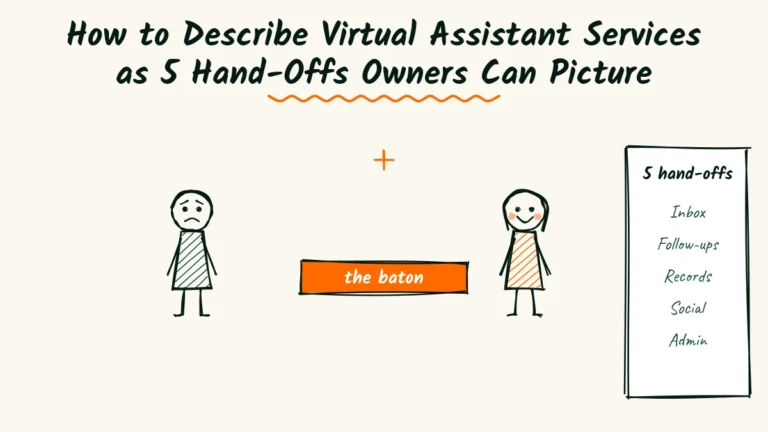

In a relay race, the baton hand-off decides more races than raw speed does. A fast runner who fumbles the pass still loses.
Hiring help feels the same to a busy owner. Before they book your virtual assistant services, they aren’t doubting that you work hard.
They’re worried about the hand-off. What exactly do I pass over? How do I explain it? What if something gets dropped?
So describe your work as a set of clean hand-offs, not a list of everything you could possibly do.
This guide shows you how to write five common hand-offs in plain words.
You’ll set hour blocks and prices, explain passwords and access, and walk owners through the first week.
Along the way you’ll get a sample services page, a fill-in template and swaps for the jargon that makes owners nervous.
Why “I can help with anything” scares owners
Many assistants open their page with a promise to handle anything. It sounds generous. To a tired owner, it sounds like homework.
If you can do anything, they have to work out what to give you. That’s the exact job they were hoping to escape.
A short, specific menu does the thinking for them.
It says, here are five things owners like you usually hand off, and here’s what each one looks like.

You can still take on odd jobs. Just don’t lead with them. Lead with the work owners already know they want gone.
Who’s handing you the baton?
Before you write your menu, picture the owners who hire you most. Their week shapes which hand-offs matter.
| Owner | What’s piling up | First hand-off to offer |
|---|---|---|
| Solo coach or consultant | Scheduling and follow-ups | Calendar and inbox |
| Real estate agent | Listings paperwork and reminders | Client updates and admin |
| Small online shop | Orders, messages, product uploads | Customer messages |
| Therapist or tutor | Booking changes and reminders | Calendar and intake forms |
Pick the one or two you serve best. Your examples, words and prices should all point at them.

This also helps owners trust you faster.
When they see their own kind of business named on the page, they stop wondering whether you’ll understand it.
Virtual assistant services as 5 hand-offs
Most owners hand off the same few things first. Describe each one with three parts.
What you take, what the owner keeps and how you’ll report back.
Here are five hand-offs that cover most small businesses.

Hand-off one, the inbox and calendar
You sort email, answer routine questions from saved replies and flag anything that needs the owner.
You book, move and confirm appointments.
The owner keeps decisions, sensitive replies and anything personal. You send a short summary at the end of each day.
Hand-off two, client follow-ups
You send reminders, thank-you notes, review requests and check-ins after a set number of days. You track who replied and who didn’t.
The owner keeps pricing talks and anything that needs their voice. You share a weekly list of open conversations.
Hand-off three, records prep
You gather receipts, match invoices to payments and file documents where the bookkeeper can find them.
You don’t do the bookkeeping itself.
Say that clearly. Owners feel safer when you name the edge of your job.
Hand-off four, social scheduling
You format posts the owner approves, schedule them and collect simple numbers each month.
You can draft captions if the owner wants, but they approve every one.
The owner keeps the voice and the final say.
Hand-off five, online admin
You update website text, upload products, fix broken links and keep tools tidy. It’s the stuff that lingers on a list for months.
The owner tells you what to change. You confirm when it’s done, with a link.

Sell hours in blocks owners can picture
Hourly rates make owners nervous. They imagine a meter running every time they send you a message.
Monthly blocks feel calmer. Owners know the cost up front, and you know your schedule.
| Block | Hours a month | Good for |
|---|---|---|
| Starter | 10 | One hand-off, like inbox and calendar |
| Steady | 20 | Two or three hand-offs |
| Full support | 40 | Most daily admin |
Show a price next to each block, even if it’s a starting price. Owners compare quickly, and a missing number often reads as expensive.
Say what happens to unused hours. Many assistants let a few roll over for one month.
Whatever you choose, write it down in one sentence.

The bookkeeper services guide uses a similar idea, turning a month of hidden work into something an owner can see at a glance.
Turn each hand-off into time saved
Owners don’t buy hours. They buy time back. Say how much of their week each hand-off usually frees up.
Be honest and use ranges.
“Most coaches get back three to five hours a week from inbox and calendar alone.”
Base the number on your own clients, and update it as you learn.
Then say what that time could become. More client sessions, an earlier finish on Fridays or dinner without a laptop on the table.
That last part matters. An owner doesn’t dream about a tidy inbox. They dream about what they’d do once it’s tidy.
Name the tools, briefly
Owners want to know you won’t need training on everything. A short line of tools you already use is enough.
Keep it to the common ones.
Google Workspace, Microsoft 365, Calendly, Canva, Trello or Asana, and whatever booking tool your niche uses most.
Then add one sentence about learning theirs.
“If you use something else, I’ll learn it on my own time in the first week.” That line removes a real worry.
Don’t list twenty apps. It looks like padding, and owners rarely care beyond the two or three they already use.
If you have a skill most assistants don’t, like setting up a booking system from scratch, give it its own line.
One standout skill is easier to remember than a long list.
Explain how you’ll handle access
The biggest fear in any hand-off is trust. Owners are giving a stranger the keys to their inbox, calendar and sometimes their money.
A short, calm section on access can do more for bookings than any testimonial.
What to promise
Say you’ll use your own login wherever a tool allows it, so access can be removed in one click.
Say you’ll use a password manager for any shared logins.
Mention two-step sign-in and that you’ll never ask for banking passwords. If you sign a confidentiality agreement, say so.
What owners keep
Owners should always own their accounts, files and passwords. Say that plainly, and say what happens when you stop working together.
“When we part ways, I hand back every file and remove my access the same day.” One sentence like that closes a door owners worry about.
If something goes wrong
Mistakes happen in every hand-off. A reminder goes out twice, or a meeting lands in the wrong time zone.
Say how you’ll handle it, in one plain promise.
“If I make a mistake, I tell you the same day, fix it and note how to avoid it next time.”
Owners trust people who own their slips far more than people who claim they never slip.

Mention that you’re a contractor
Some owners have never hired help before. They wonder about payroll, taxes and paperwork, and the worry alone can stop them booking.
Most virtual assistants work as independent contractors, running their own business and serving several clients.
Say that, in plain words, on your page.
The IRS explains how it tells the difference between an independent contractor and an employee. You don’t need to explain the rules.
Just point owners to their accountant if they have questions.
Keep this short and friendly. It’s a reassurance, not legal advice.
Walk them through the first week
A first week laid out step by step turns a scary hand-off into a plan. Owners can picture it, so they can say yes to it.
- Day one, a 30-minute call to list what you’ll take over first.
- Day two, you set up your access and save their common replies.
- Days three and four, you run the hand-off while they watch.
- Day five, a short check-in to adjust anything that felt off.
By the end of the week, one job is fully off their plate. That’s a far easier promise to believe than “I’ll handle everything.”
In week two, you add the next hand-off the same way.
Most owners are surprised how quickly the list shrinks once the first job is gone.

Give owners a hand-off note to fill in
Many owners freeze at the start because they don’t know how to brief you. They know the work in their heads, not on paper.
Offer a short note they can fill in for each task. It makes the first hand-off feel easy, and it gives you everything you need.
Task name, in a few words.
How often it happens, like daily or every Monday.
Where it lives, like Gmail or the booking app.
What a good result looks like.
What I always want to decide myself.
Put this note on your services page or send it after the first call. Owners often say it’s the moment hiring help finally felt real.

Keep every completed note in one shared folder.
Six months later, it becomes a simple manual for the business, which owners value far more than they expect.
Show what a normal week looks like
After the first week, owners wonder what working with you feels like day to day. A short picture of a normal week answers that.
Keep it simple and true to how you actually work.
- Monday, you share the week’s open follow-ups and upcoming appointments.
- Tuesday to Thursday, you handle the hand-offs and flag anything urgent.
- Friday, you send a short summary of what’s done and what needs a decision.
Some owners like a quick voice note instead of a written summary. Offer both and let them choose.
Small choices like that make the hand-off feel built for them.
Owners love a predictable rhythm. It means they don’t need to chase you, and they always know where to look for updates.
Say how fast you reply on weekdays, too. “Within four working hours” is clear. “As soon as possible” isn’t.

Answer the money questions up front
Owners have a few money questions they’re too polite to ask on the first call. Answer them on the page.
How and when they pay
Say whether you bill at the start of the month or the end, and how. Most owners prefer one invoice on a set date.
If you charge for extra hours, say the rate and that you’ll ask before going over.
How to stop
Say how much notice either side gives, like two weeks or 30 days. Owners book more easily when leaving feels simple.
It sounds odd to explain how to fire you. It’s actually one of the strongest trust lines on the page.
A sample services page
Here’s how all of this looks on one page, for an assistant named Ezra in Muncie, Indiana, who works mostly with solo coaches.
Virtual assistant for coaches who’d rather coach than do admin.
I take your inbox, calendar and client follow-ups, so your week has room for actual clients.
Starter, 10 hours a month, from $350. One hand-off, like your inbox and calendar.
Steady, 20 hours a month, from $680. Inbox, calendar and follow-ups.
You keep your accounts and passwords. I use my own login and a password manager.
First week, one job fully off your plate. Book a 20-minute chat to choose it.
It’s short on purpose. Every line answers a question an owner would otherwise email you about.
Fill in one hand-off of your own
Use this template for each service on your page. Keep every line to one sentence.
[Name of the hand-off, in plain words.]
I take [the tasks you’ll do].
You keep [the decisions or tasks that stay with the owner].
Each [day or week], I send [what you report back].
Good fit if [a sign the owner needs this].
Write all five, then cut the ones you don’t enjoy. Your page should sell the work you actually want more of.
Swap the jargon for plain words
Virtual assistant pages often borrow corporate language. It sounds polished and says very little.
| Jargon | Plain words |
|---|---|
| Streamline your operations | I take the admin off your plate |
| Leverage my expertise | I’ve done this for 30 coaches |
| Comprehensive support solutions | Inbox, calendar and follow-ups |
| Scalable partnership | Add hours when you get busier |
| Seamless integration | I learn your tools in week one |
Read each line out loud. If it sounds like a slide in a sales meeting, rewrite it the way you’d say it on a call.

The product photographer services guide works through the same problem for a very different trade.
Both come down to letting the reader build an order in their head.
Say what you don’t do
A short “not included” list builds as much trust as the services themselves.
It shows you know your limits, and it saves awkward talks later.
- I don’t do bookkeeping or taxes, but I prepare records for your bookkeeper.
- I don’t make purchases without written approval.
- I don’t reply to sensitive client messages without checking with you.
- I don’t work weekends unless we agree on it ahead of time.
Owners rarely mind these limits. They mind finding out about them in the middle of a busy week.
If there’s work you’d happily refer out, say so.
“For bookkeeping, I work alongside your bookkeeper or can suggest one.” A good referral makes you look bigger, not smaller.
Revisit this list every few months. As you learn new skills, a few items may move from not included to a paid add-on.
Test your page on a real owner
You know your work too well to read your page like a stranger. Find an owner who has never hired help and ask for ten minutes.
Hand them the page on their phone and stay quiet while they read.
Three questions to ask
Ask these after they finish, without giving hints.
- What would you hand off to me first?
- What would that cost you each month?
- Did anything make you nervous?
If they can’t answer the first two, your menu or prices aren’t clear yet.
If the third question gets a yes, fix that line before anything else.

Watch where they pause
Owners usually pause at access and price. That’s normal, and it tells you where a little more reassurance is needed.
Add one sentence where they stopped. Small fixes in those two spots often matter more than a full rewrite.
Then ask a second owner a month later. If both pause in the same place, that line still needs work.
Add proof owners can believe
New assistants often feel they have nothing to show. You have more than you think, as long as it’s specific.
Small numbers work
“Cleared a 2,000-email inbox in nine days.”
“Moved 40 appointments when a client switched booking tools.” Plain numbers beat words like dedicated and reliable.
Ask permission before you use a client’s name. Many owners are happy to be quoted if you send them the line to approve.
Show a before and after
A screenshot of a messy calendar next to a tidy one, with details blurred out by the client, tells the story fast.
So does a short note from a client about getting their evenings back.
Keep two or three of these near your prices. That’s where owners need the extra push.
Ask at the right moment
The best time to ask for a review is right after you’ve saved an owner real time.
A tidy inbox, a smooth tool switch or a busy month handled without drama.
Send one short message with a link and a single question.
“What changed for you since we started?” The answers make better proof than any star rating.

Raise your prices without a scene
As you get faster and busier, your blocks will need new prices. Owners handle increases better when they see them coming.
Give plenty of notice
Tell current clients at least a month ahead. Say the new price, the date it starts and one line about why.
“From March 1, Steady moves to $720. It’s my first change in two years.” Calm and specific beats a long apology.
Update the page first
Change your public prices before you write to clients.
Owners sometimes check, and a match between your email and your page shows you’re being straight with them.
Thank the clients who stayed
Some assistants keep long-time clients on the old rate for a few extra months.
It’s a small cost that says thank you in a way people remember.
If you do this, set an end date and write it down. A kind gesture with no end turns into a problem two years later.
Take the baton
Clear virtual assistant services pages win clients because they make the hand-off feel safe.
Five named jobs, a block of hours, rules for access and a first week an owner can picture.
Right now, plenty of owners are drowning in admin and still haven’t hired help.
A calm, specific page can be the first one that makes the leap feel small.
The competition is real, though. Cheap task apps and AI tools now promise to handle email for almost nothing.
If your page sounds vague, owners will try those first.
So pick the hand-off you do best and write it up this week.
Use the five-line template, add a starting price and show it to one owner who’s never hired help.
Frequently Asked Questions
Should a virtual assistant work in the owner’s time zone?
Not always. Agree on a daily window for replies, and say in your page which hours you’re usually online.
Can I offer a trial week?
Yes, if it’s paid and scoped to one hand-off. A small, paid trial attracts serious owners and protects your time.
What if an owner wants me to post as them on social media?
Agree on a clear approval step first. Draft, they approve, then you post. Never publish in their name unchecked.
Do I need insurance as a virtual assistant?
Many assistants carry professional liability insurance. Ask a local insurance agent what fits your work and clients.
How many clients can one assistant handle?
It depends on hours, but many full-time assistants keep four to six steady clients so no one feels rushed.

Read next
How to Develop a Brand Photography Marketing Strategy Using Client Psychology

Owners notice, check, compare, trust, book and recommend. Give each of your 9 marketing pieces a job at one of those 6 steps.
Read NowHow to Describe Brand Photographer Services Like a Clear Quote (6 Questions)

Owners trust a clear quote. Describe your services by answering 6 plain questions, from what you shoot to where photos can go.
Read NowPersonal Branding Photographer Marketing Strategy in 9 Simple Jobs

Marketing feels like a pile until each tool gets a job. Learn the 9 jobs, the right order and a calm weekly rhythm.
Read Now