

Her Pinterest board has 412 pins, and no two rooms look alike. Velvet sofas, white kitchens, a dark green library and a beach cottage.
She knows her home feels wrong. She can’t say why, and she has no idea what fixing it would cost.
So she searches for help and lands on your interior designer website.
What does she find? Often a beautiful gallery with no words, a line about “timeless elegance” and a contact form with twelve steps.
She leaves feeling more confused than when she arrived.
Not because your work isn’t good, but because your site didn’t translate it for her.
Designers already know a tool that solves this. The design brief. It turns a messy wish list into a clear plan.
This post walks through writing your site like a brief, in 7 sections. Client, problem, style, scope, budget, timeline and next step.
Treat your site as a brief, not a gallery
A gallery shows what you made. A brief explains who it was for, what they needed and how it came together.
Clients can admire a gallery. But they hire from a brief, because it helps them picture working with you.
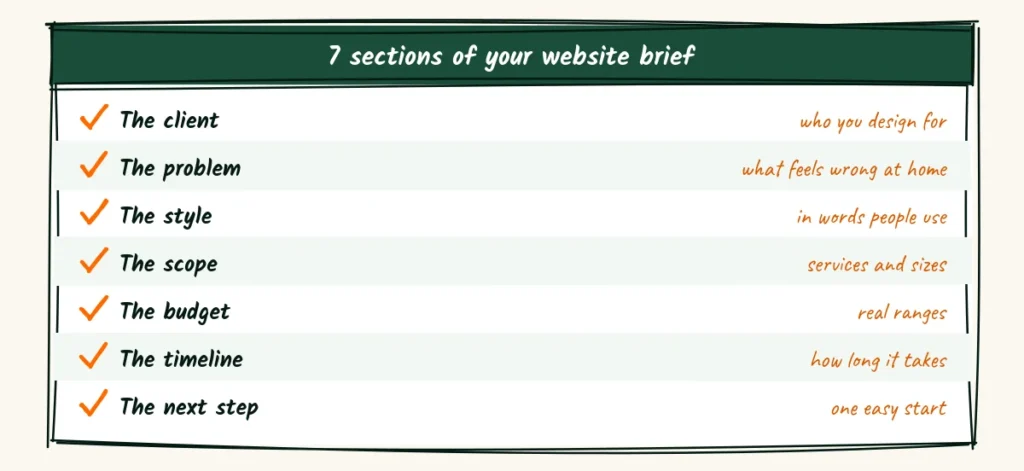
| Brief section | Where it lives on your site |
|---|---|
| The client | Homepage first screen |
| The problem | Homepage and service pages |
| The style | About page and project stories |
| The scope | Services page |
| The budget | Services or investment page |
| The timeline | Process page |
| The next step | Every page, one button |
You don’t need a new design to do this. You need new words in the right places.
The client goes on the first screen
Your first screen should tell a visitor who you design for and how you help. In a few seconds, they should think, “That’s me.”
Many design sites open with a huge photo and a single word, like “Inspired.” Lovely, but it doesn’t help someone decide.
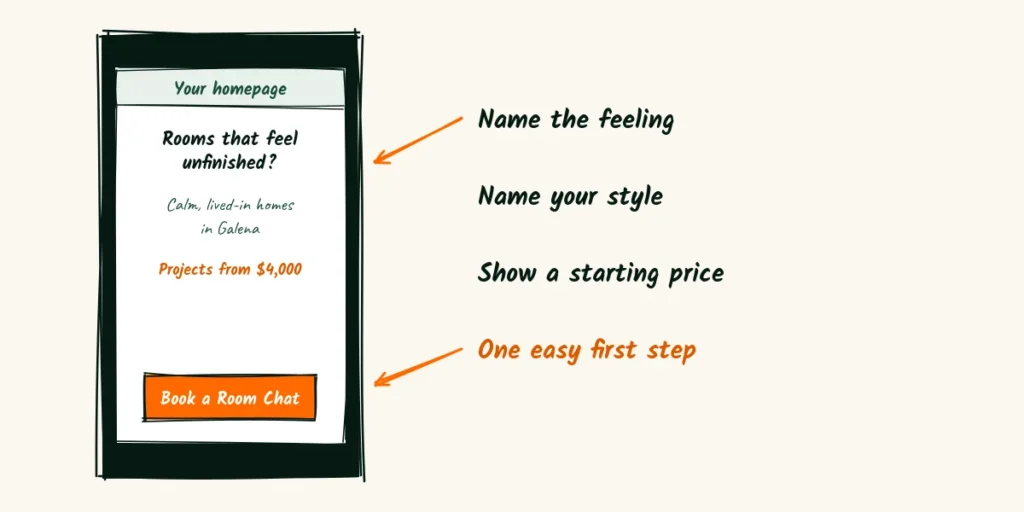
Three lines and one easy step
Name the feeling, name your style or area, show a starting price, then offer a low-risk step.
[Feeling the client has about their home]?
[Your style] homes for [type of client] in [area].
Projects from [starting price].
[Book a room chat]
A filled version might say this. “Rooms that feel unfinished? Calm, lived-in homes for busy families in Galena. Projects from $4,000.”
The starting price filters gently. People who can’t afford you won’t waste your time, and people who can feel welcome.
Name the people you serve best
You may design for many types of clients, but your site should name the ones you love most.
Finish this line before you write anything else. “I design homes for [type of client] who want [outcome] without [common fear].”
For example, “I design homes for young families who want calm rooms without losing their personality.” That line can guide every page.
What problem are they living with?
Clients rarely search for “interior design services.”
They search for a feeling. “Living room feels cold,” “small kitchen ideas,” “how to make an old house feel new.”
Your site should name those feelings in their words. People trust someone who describes their problem better than they can.
Problems clients describe
Here are a few common ones. Pick the ones you hear most often and use them on your homepage and service pages.
- The house feels like a collection of random furniture.
- We moved in two years ago and still haven’t finished.
- The rooms look nice in photos but feel uncomfortable to live in.
- We bought expensive things and it still doesn’t feel right.
- Our kids and pets destroy everything we buy.
Use one or two of these lines near your services. Each one is a mirror that helps the right client recognize themselves.
Describe your style in words people actually use
Designers often use words that sound beautiful but mean little to clients. “Curated.” “Elevated.” “Timeless elegance.”
A client reading those words can’t picture anything. They need materials, colors and feelings they can almost touch.
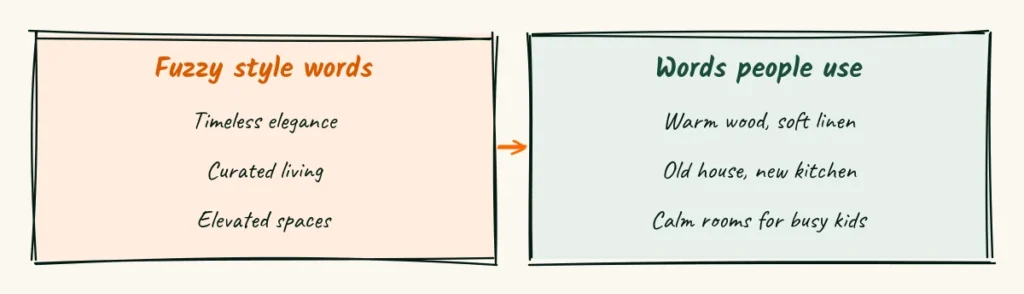
Swap fuzzy words for plain ones
| Present | Better |
|---|---|
| Timeless elegance | Warm wood, soft linen, nothing too shiny |
| Curated living | A mix of new pieces and things you already love |
| Elevated spaces | Rooms that feel calm when you walk in after work |
| Bespoke design | Furniture sized for your exact room |
Read your About page and service pages out loud. Each time you hit a word you’d never say to a client in person, swap it.
Show your style with three words
Some designers find it helpful to pick three plain words that sum up their style. “Warm, practical, layered.” “Bright, simple, playful.”
Use those words on your About page and in your project stories. Over time, people start to connect them with you.
Interior designer website projects that tell a story
Your portfolio is your proof. But a wall of finished photos only tells half the story.
Clients wonder what the room looked like before, what it cost and how long it took.
A short story under each project answers those questions and helps clients picture their own project.
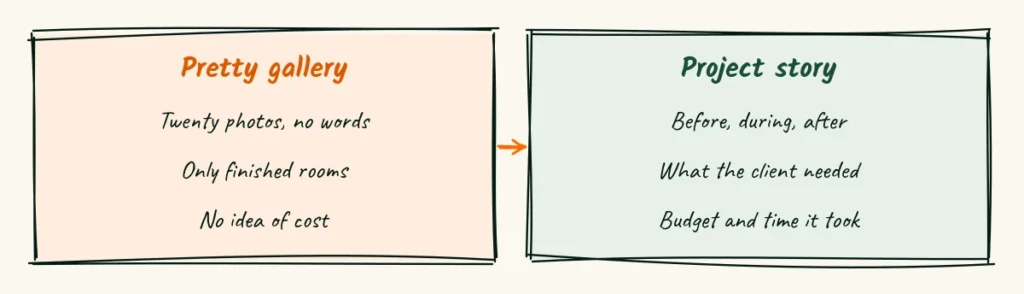
A project story in five short lines
Under each project, add a few plain lines. You don’t need a long case study.
The client. [Who they are, in one line.]
The problem. [What felt wrong at home.]
The plan. [The main changes you made.]
The budget and time. [Rough range and weeks.]
The result. [How they feel or live now.]
Ask clients for permission before sharing details. Many are happy to share if you keep their names and addresses private.
Show before, during and after
Before photos build trust. They prove the room really changed. Clients love seeing the messy middle too, because it feels honest.
If you didn’t take before photos in the past, start with your next project. Even phone photos work for this.
Write captions that teach
Each photo can carry a short caption. Not a decoration, a tiny lesson.
“We moved the sofa away from the wall to make the room feel bigger.”
Captions like this show your thinking and make clients want more of it.
What can they hire you for?
Many clients don’t know how interior designers work. They wonder if you only do whole houses, or if they can hire you for one room.
A clear services page answers that. Three simple options usually cover most clients.
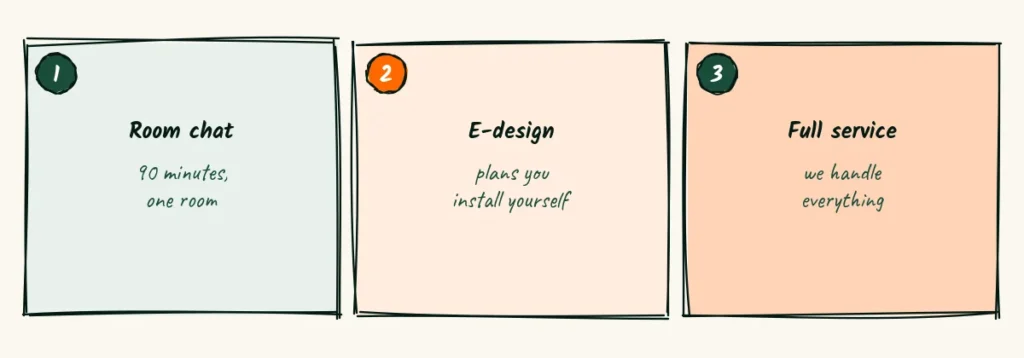
A room chat
A short, paid visit or video call about one room. You give ideas, a layout sketch and a shopping list. Clients do the rest.
This is a great first step for nervous clients. It lets them try working with you without a big commitment.
E-design
You create a full plan, with layout, colors and a list of pieces with links. The client buys and installs everything themselves.
This works well for clients in other towns or on tighter budgets.
Full service
You handle everything from the first plan to the final pillow. Ordering, trades, delivery and the reveal day.
Explain that this is the most involved option, and say what it includes in plain words.
Welcome clients who live far away
E-design opens your work to people in other towns. But remote clients have their own worries. Will the plan fit my room?
How do I measure?
A short section for them removes the guesswork.
What remote clients need to know
Explain how you’ll gather details. Photos, a short video walk-through and a simple measuring guide usually cover it.
Then say how you’ll stay in touch. “We meet by video at the start and again when your plan is ready.
In between, I answer questions by email within a day.”
Finally, say what happens if something doesn’t fit. A clear answer here turns a nervous stranger into a confident client.
Talk about budget before they ask
Budget is the question every client has and many are afraid to ask.
Hiding it behind “Contact us” makes them assume the worst, or worse, assume too little.
Showing starting prices builds trust. It also saves you from long calls with people who can’t afford the project.

Explain where the money goes
Many clients don’t know the difference between your fee and the cost of furniture. Explain it in two or three lines.
Your project budget covers two things. My design fee, and the furniture, materials and trades.
For most one-room projects, the design fee is about [percent or amount] of the total.
Add one line about how you protect their budget.
“We agree on a budget before anything is ordered, and I’ll tell you before anything changes.”
How long will this take?
Clients often imagine a TV makeover. Three days and a reveal.
Real projects take longer, especially with custom furniture or contractors.
An honest timeline prevents frustration later.
Give typical timelines
List rough ranges for each type of project.
- Room chat. One visit, with notes in about a week.
- E-design. About three to four weeks for the plan.
- One room, full service. About three to five months.
- Kitchen or whole home. Six months or more.
Then explain what slows things down. Furniture lead times, contractor schedules and decision time.
People accept delays more easily when they expect them.
Say what you need from them
Projects move faster when clients know their part. List the few things you’ll ask of them.
- Quick replies on decisions, ideally within two days.
- Access to the home for measuring and installs.
- One person who has the final say.
- Honest feedback, even when it’s “I don’t love this.”
Framing it as teamwork feels kind, not bossy. Clients who know their role tend to enjoy the process more.
Walk them through your process
A clear process makes you look organized and calm. Clients like to know what happens next, especially on a big project.
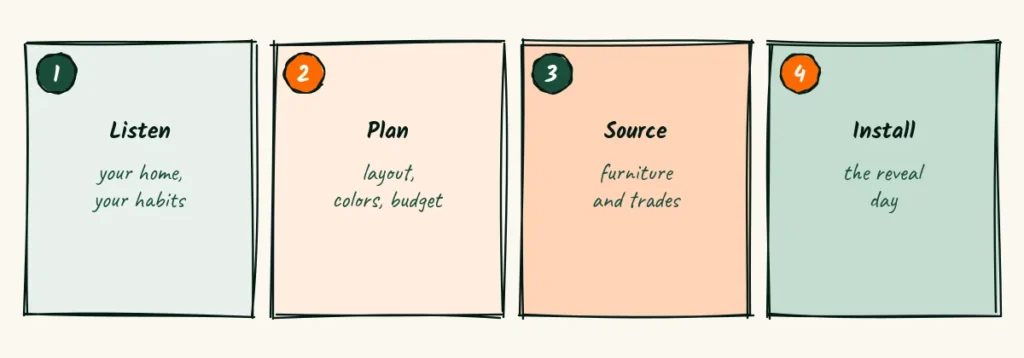
Four steps in plain words
Describe each step in one or two lines.
Listen. We meet in your home and talk about how you really live, not just how you want it to look.
Plan. I create a layout, colors and a list of pieces, all within your budget.
Source. I order furniture and book trades, then track every delivery.
Install. We set everything up in a day or two, and you come home to a finished room.
Write an About page with taste and warmth
Your About page should feel like meeting you for coffee.
Clients will spend weeks working with you inside their home, so they want to like you.
Skip the long list of awards at the top. Lead with your story and how you work.
A short About template
I’m [name], and I design [type of homes] for [type of clients] in [area].
I fell in love with design when [your honest story, in one line].
My style is [your three plain words].
When I’m not working, you’ll find me [one human detail].
Add a photo of you in a room you designed, or in your studio. Clients want to see your face and your taste at the same time.
Answer the worries clients carry quietly
Hiring a designer feels personal. Clients are letting someone judge their taste, their home and their budget.
Some worries never get said out loud.
A short section on your services or About page can answer them before they become reasons to wait.
Will you respect what I already own?
Many clients fear being told to throw everything out. Reassure them in one or two lines.
We start with what you love. Your grandmother’s chair, your art and your books often become the heart of the room.
Will I be pushed to spend more?
Say how you handle budget changes. “If an idea costs more than planned, I’ll show you a cheaper option too, and you choose.”
This one line can calm a lot of nerves, especially for first-time clients.
What if I don’t like the plan?
Explain how revisions work. “Your plan includes two rounds of changes. Most clients only need one.”
Clients relax when they know they can say no without starting a fight.
Collect reviews that describe the change
“She has amazing taste!” is a nice review, but it tells a future client very little. A useful review describes life before and after.
Ask a question that leads to a story
When you ask for a review, guide it gently.
Could you share how the room felt before we started, and how it feels to live in now?
Answers like “We finally eat dinner at the table again” or “The kids’ toys have a home now” sell your work far better than praise.
Place reviews next to matching projects
Put each review under the project it describes.
A review about a small apartment belongs with that apartment, not on a general reviews page.
That pairing gives future clients proof right where they’re already looking.
Show the small details that build trust
Big projects involve big money. Clients want signs that you’re organized and reliable, not just talented.
Practical trust lines
Add a few plain lines near your services or process.
- Insured for work in clients’ homes.
- Trade accounts that often lower furniture costs.
- Trusted painters, carpenters and installers you’ve worked with for years.
- Written agreements before any order is placed.
These details aren’t glamorous. But for the partner who approves the budget, they often matter more than any photo.
Make the inquiry form feel like a first conversation
Many design inquiry forms feel like a test. Square footage, exact budgets, style quizzes. Busy people give up halfway.
Ask only what you need to decide if a call makes sense. The rest comes out in conversation.
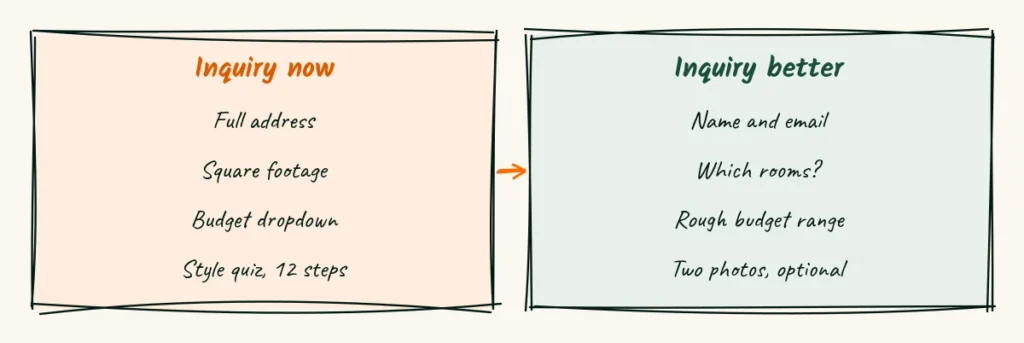
A short form that still filters
Name and email, which rooms, a rough budget range and an optional spot to upload two photos. That’s enough.
The budget range does the filtering for you. Offer ranges that start at your minimum, so people see what’s realistic.
What happens after they press send
Show a warm thank-you message, and tell them what to expect.
Thanks, [name]. I’ll look at your rooms and reply within [time]. If it’s a good fit, we’ll set up a short call to talk about your home.
Follow up with a short welcome note
After the first call, send a note that sums up what you heard. The rooms, the feeling they want and the rough budget.
Clients love seeing their messy wish list turned into three clear lines.
It’s the first sign that hiring you will make life calmer, not busier.
Help search engines see your rooms
Your photos are your best content, but search engines can’t see them without help. A few small steps make them findable.
Name your photo files and fill in alt text
Rename photos before uploading. “galena-living-room-warm-wood.jpg” beats “IMG_4821.jpg.”
Add a short alt text that describes what’s in the photo. Google’s guide to image search best practices explains why this matters.
Use local words on your pages
Mention your town and nearby areas naturally.
“Interior designer in Galena” on your homepage and “Kitchen refresh in a Galena farmhouse” on a project page.
People often search with their town name. Make it easy for both people and search engines to connect you with that place.
Run three tests before you share the link
You see your site as a designer. Clients see it as someone tired of their own living room. Borrow their eyes before you call it done.
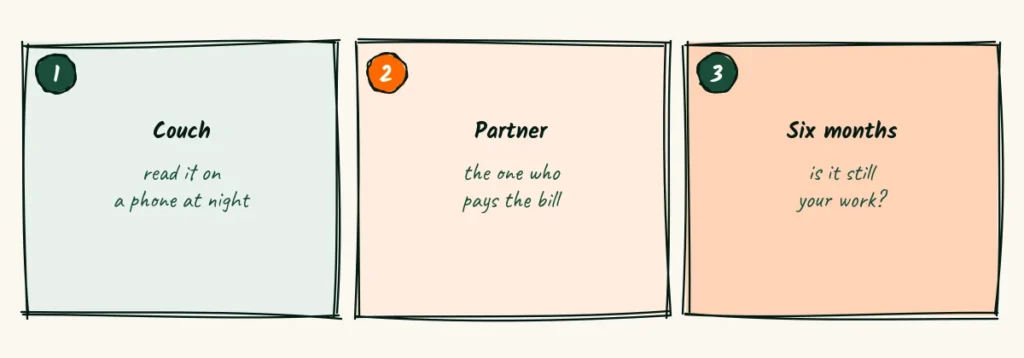
The couch test
Open your site on your phone at night, lying on the couch. That’s when many clients browse.
Can you tell who you help, what it costs and how to start, without zooming? If not, adjust the first screen.
The partner test
In many homes, one person finds the designer and another approves the budget. Ask someone to read your site as the one paying.
Would they feel comfortable with the starting price and the process? If they hesitate, make the budget page clearer.
Listen for the exact words they use when they hesitate.
“I’d want to know what’s included” or “That seems like a lot for one room” both point to lines your site is missing.
Add an answer to each one, in their words, on the budget or services page.
The six month test
Look at your portfolio and ask one question. Does this still represent the work I want to do?
Remove projects that no longer fit your style or your ideal client.
A smaller portfolio of the right work beats a big one of everything.
Keep the brief current
A design brief changes as a project grows. Your website should change as your business grows.
Update your portfolio each season
Add one finished project each season, with its short story. Remove one older project that no longer fits.
That steady swap keeps your site fresh without a big rewrite.
Check prices and timelines every six months
Furniture costs, trade rates and lead times change. Update your starting prices and timelines so clients aren’t surprised.
If you raise prices, update the site first. It saves awkward conversations later.
Share your site in print too
If you hand out an interior designer flyer at home shows or furniture stores, point it to one project story with a QR code.
You’ll find ideas for every page in the website copy guides.
Her 412 pins need a translator
An interior designer website that reads like a clear brief turns a confused browser into a confident client.
The opening is real. Many design sites still lead with a single word and a gallery, so plain words about budget and process stand out.
The risk is drifting back into fuzzy language. “Timeless” and “curated” creep in fast, and old prices quietly break trust.
This week, rewrite your first screen with the feeling, your style and a starting price.
Then add a five-line story under your best project.
Next week, shorten your inquiry form and run the couch test.
One clear section at a time, your site becomes the translator between her Pinterest board and the home she wants.
Frequently Asked Questions
Should interior designers show the brands they buy from?
It can help, but check your trade agreements first. Some suppliers prefer not to be named on designer websites.
Do I need a separate page for each room type?
Not at first. A good services page plus a few project stories covers most needs. Add room pages once you have strong examples.
Can I use stock photos until I have my own projects?
Use them sparingly and never present them as your work. Clients feel misled when they discover a photo isn’t yours.
Should I offer free consultations on my website?
Many designers offer a short free call, then a paid room chat. It filters serious clients without giving away your expertise.
How often should I post new projects?
Once a season is plenty for most solo designers. Quality and a short story matter more than frequency.

Read next
Math Tutor Website Copy, Graded Like a Report Card in 8 Subjects
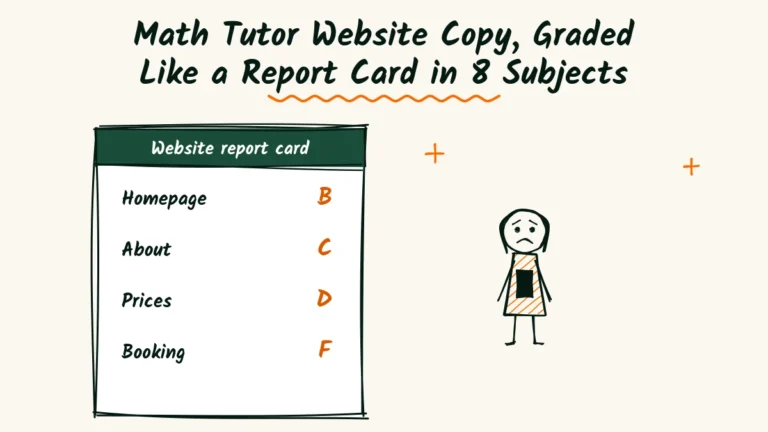
Grade your tutoring site like a report card. 8 subjects, from the first screen to safety lines, with a clear fix for every low...
Read Now9 Real Estate Agent Website Myths That Keep Sellers From Calling
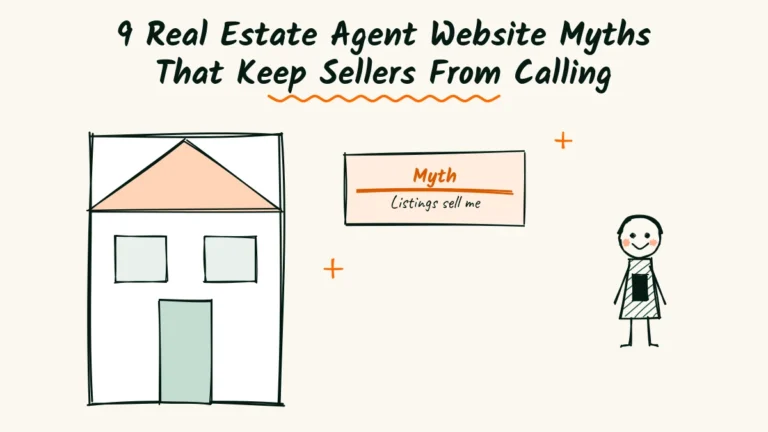
Listings won't sell you, and a long bio won't either. 9 website myths agents believe, with plain words to use instead.
Read NowA Wedding Planner Website Run Like the Big Day, in 9 Time Slots

Run your website like a wedding day. 9 time slots, from the first hello to the inquiry send-off, with words couples trust.
Read Now