

Most of these case studies come from emails my readers send me. With their permission, I share them with the names changed. I do this so that others can learn from what worked and what didn't. Have a story of your own? Share it with me.
- 22 to 9emails per job
- 7repeat clients
- 6email templates

The shoebox of lavender soaps sat behind a planter on Mireille Dufresne’s porch for two days before she found it.
By then, the soap maker had sent three emails asking if it had arrived. The third one was polite, but you could feel the worry in it.
That week, Mireille’s product photographer email habits changed for good.
Her studio sits above a hardware store in Bozeman, Montana, where she shoots soap, tea and small home goods for online sellers.
Four months after she fixed her emails, messages per job had dropped from about 22 to 9.
Seven clients also came back for a second shoot.
The problem
Mireille’s photos had always been good. Her clients said so, and their listings showed it.
The weak spot was everything around the photos.
She answered emails as they came, typed each one from scratch and often forgot what she had already told whom.
Looking back at a month of messages, she noticed they arrived in three waves.
At six in the morning
Sellers who had shipped boxes the day before woke up and checked tracking.
If it said “delivered” and Mireille hadn’t written, they emailed to ask.
These messages were nearly all the same. Did it arrive? Is everything okay? Is anything broken?
In the middle of shoots
Questions about shot lists landed while her hands were full of props.
She’d reply hours later, by which time the seller had asked again.
A few sellers added products by email on shoot day, which threw off her timing for the whole afternoon.
She said yes every time, without mentioning cost, and then felt awkward adding it to the invoice later.
Late at night
The gallery emails sparked a second wave.
Sellers opened the link at night, saw a folder of 60 files and had no idea which ones went on Etsy.
Then came the color notes. “This looks darker than the real thing.” Each one turned into a long thread.
The solution
Mireille decided that every worried question deserved an answer before it was asked.
She sat down for an afternoon and wrote the emails she found herself repeating.
The order followed a shoot from start to end.
It’s the same path good product photographer client emails take when sellers mail their products in.
A product photographer email kit in six parts
She ended up with six templates. A packing guide, an arrival note, a shot list check, a gallery note, a color reply and a return note.
Each one had blanks in brackets for names, dates and numbers. Each one ended with a single, clear next step.
The arrival photo
The biggest change was tiny. As soon as a box arrived, she laid the products on her table, took one phone photo and sent it.
The message was three lines long. The box arrived, here’s what I counted, here’s your shoot date. The six a.m. emails almost stopped.
The folder map
Her gallery emails now came with four folders named by use. Main images, scenes, details and web.
A short table in the email told sellers where each folder belonged. Late-night questions about which file to use mostly disappeared.
The color check
For color notes, she wrote a calm reply that asked the seller to hold the product near a window and compare it with the screen.
Most of the time, the photo matched the product and the seller’s screen was the issue.
When it didn’t match, she fixed it the same day and said so plainly.
A few weeks later, she added one more short reply, for extra products.
It said yes, gave a price and offered to swap items instead if the budget was fixed. No more awkward invoices.
The process that worked
Mireille didn’t want a fancy system. She wanted something she would actually use on a busy day. Three small places did the job.
In her email drafts
She saved all six templates in her email app, numbered in shoot order.
Gmail’s template feature let her insert one with a couple of clicks.
Before sending, she always added one personal line.
A note about a scent, a color or a client’s launch date kept each email from sounding like a robot.
On a card by the packing table
Next to the table where she unpacked boxes, she pinned a small card with four words. Count, photo, send, label.
It reminded her to count the products, take the arrival photo, send the note and check for a return label before anything else.
In a simple spreadsheet
She kept one row per client, with columns for each of the six emails. A tick went in each box as she sent them.
On Monday mornings, she scanned the sheet for empty boxes. That five-minute habit caught the emails she would have forgotten.
What we learned from here
Mireille’s story shows that a product photographer email works best when it answers the worry before it turns into a question.
Her photos didn’t change at all. Her clients’ experience changed completely.
Here’s how her old and new habits compared.
| Saved an email | Started a thread |
|---|---|
| A photo of the products on arrival | “Got it, thanks!” with no details |
| Folders named by where they go | One folder of 60 files |
| A daylight color check | Arguing that the photo was right |
| One clear next step per email | Five questions in one message |
The results showed up within a season. Messages per job fell from about 22 to 9.
Seven of her clients booked a second shoot within four months, and three of them mentioned her emails in their reviews.
Photos beat paragraphs
The arrival photo did more than any sentence she wrote. Sellers could see their products were safe, so they stopped asking.
Templates still need a human line
The templates saved her hours, but the personal line at the top kept clients feeling looked after.
When she skipped it once in a rush, a client asked if she had hired an assistant.
What she’d add next
Mireille plans to add a short check-in email three months after each shoot.
She’s curious how the photos are doing for each shop, and she suspects it will bring even more repeat bookings.
More case studies
Brand Photographer Cormac Rewrote 6 Emails and Got Paid in 6 Days

- 31 to 6days to get an invoice paid
- 0shoot day surprises in 11 projects
- 2refresh bookings from check-ins
Nadine’s Shorter Emails Take Her Portrait Photographer No-Shows From 3 to 0

- 3 to 0no-shows in 20 sessions
- 8 to 2late starts in 20 sessions
- 6 to 17same-day replies out of 20
Headshot Photographer Ruth Rewrites 5 Emails and Books 11 of Every 20 Inquiries

- 3 to 11of every 20 inquiries booked
- 2 days to 2 hoursfirst reply time
- 6 to 0late arrivals a month
1 Long Guide Becomes 6 Short Emails for Maternity Photographer Annika, and Clients Read Them

- 9 to 4emails back and forth per client
- 4 to 13reviews per season
- 19hours saved in one season
11 Families Return After Newborn Photographer Darnell Cuts His Emails to One Screen

- 85%shorter emails, from 640 words to 95
- 6 to 1basic question texts before each session
- 11milestone sessions booked in 4 months
Personal Branding Photographer Noelle Cut Her Welcome Email to 6 Lines

- 3 to 8bookings from every 10 inquiries
- 4 pages to 6 linesher welcome email
- 5 hourssaved each month on replies
Product Photographer Greer Wrote 9 Posts for Sellers and Got 6 Inquiries a Month
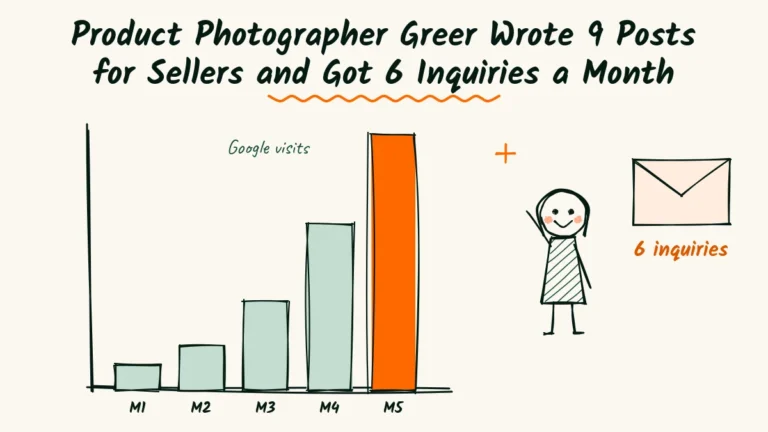
- 60 to 900Google visits a month
- 0 to 6blog inquiries a month
- 9new posts in 5 months
Product Photographer Petra Cut 3 Words From Her Ad and Got 11 Messages a Month

- 2 to 11messages a month
- 5new shop clients
- $240spent on the whole test